Custom graphic for Google maps polyline

I’ve been looking into the question wether or not it is possible to use a custom graphic for polylines (and/or polygons) in Google Maps. The result so far is very promissing and the answer is yes!

Click to launch

NOTE: right click and save as.. then run, as the gmaps API key used is not for this domain.

The feet are taken from a MovieClip and repeated for the length of the line.

I’ve achieved this by implementing the IPolyLine and IOverLay Interface. It took quite some figuring out to determine what each function was meant to do.

TBC…

TODO:

  1. Multi point line
  2. Exact line fill
  3. Flag for toggling image stretching / repeating
  4. Fixing a bug with Event dispatching
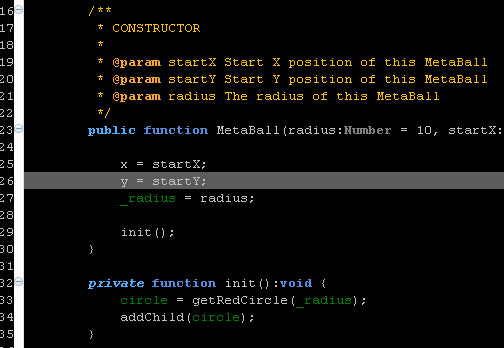
Howto create a color-scheme for FDT

I’ve been wanting to be able to use a different color-scheme (or theme) for FDT for a while. After some investigation I found out how to do this.

FDT dark color scheme

I’ve created the color scheme above and stored in an epf file, you can download it here:
http://ansuz.nl/toys/fdt/eclipse_fdt_dark_01.epf (right click and save as…)

Creating the scheme

  1. Modify your preference for text appearance (see ‘Eclipse + FDT colors‘)
  2. Hit File > Export > General > Preferences and save in a convenient location
  3. Open the saved file in your favourite text editor and remove everything that’s not color related. There are a couple of exceptions to this though, see ‘Eclipse + FDT colors update‘. Others you’ll probably find out in a trial and error proces.
  4. Add ‘file_export_version=3.0’ to the top of your file, so Eclipse knows what version the preferences were exported for. (You can also not delete this line in step 3.) If you omit adding ‘file_export_version=’ the importing of the preferences will fail.
  5. Save the file and you’re done!

Importing a scheme

  1. Hit File > Import > General > Preferences
  2. Click ‘Next’.
  3. Select the scheme to import and click ‘Finish’
  4. All done!

Eclipse + FDT colors update

I figured out what was missing in my previous attempt to store and then load my color preferences. You need to include what version of Eclipse the preferences file is exported for.

file_export_version=3.0

A couple of other things include some boolean settings for not using the system background color and using the ruler (line numbers).

/instance/org.eclipse.ui.editors/AbstractTextEditor.Color.Background.SystemDefault=false
/instance/org.eclipse.ui.editors/AbstractTextEditor.Color.Background=0,0,0

Metaballs

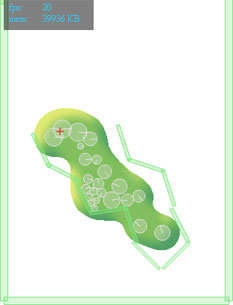
This week I’ve been working on creating a liquid effect in Flash. After a little research and a relapse to my got old 3D days I remembered a principle called ‘Metaballs‘ or ‘Iso surfaces‘. This is a nice way to replecate fluid dynamics in a 2D or 3D environment. So after some web browsing I found a nice implementation in AS3 by Szataniol. The only problem with this implementation was that it lacked alpha, which I needed to be able to apply some filters for a more realistic effect. This was easily solved by adding an extra render pass to calculate the mask. I’ll post the code for that below.

I hooked up the ‘renderer’ from Szataniol to the Box2D physics engine and starting messing around. I ended up making a couple of different versions:

I’ve set up my Main class in such a way that I can easily switch settings to create the different effects by using a different Model class.

[insert class diagram…]

TBC…

Eclipse + FDT colors

I’m trying to figure out a nice way to apply a color theme to Eclipse. So far no luck, but I have found the places where to edit color settings.

First got to Window > Preferences, then change the color settings in the following locations:

  1. General > Editors > Text Editors
  2. General >Appearance > Color and Fonts
  3. FDT > Editor > Colors
  4. FDT > Editor > Semantic Highlight

Some ideas to explore:
http://drnicwilliams.com/2006/08/08/textmate-theme-for-radrails/ (Modify the *.epf file to include FDT settings? Create a nice color scheme and export settings using File > Export > General > Preferences)
http://www.willianmitsuda.com/eclipse-plugins/eclipse-skins/ (Skin plug-in, see how to get this to work with FDT)

Update: Exported preferences, now trying to figure out how to strip all non color scheme related information.

Update 2: Found a doable way to create a color scheme for FDT, read the howto.

WOW limits reached

When trying to extend the example from yesterday I ran into the limitations of the WOW-engine.

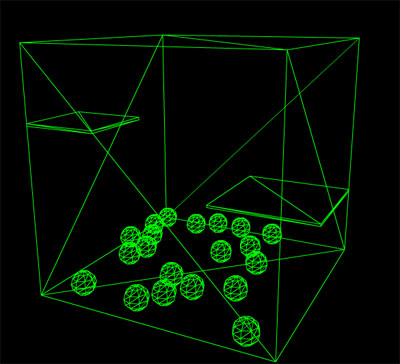
There are no rigid bodies! 🙁 So The example above, where the ‘shelves’ are supposed to be static, won’t work. However, version 2 is in alpha, so hopefully I can give that a shot soon enough.

3D Physics with PV3D + WOW

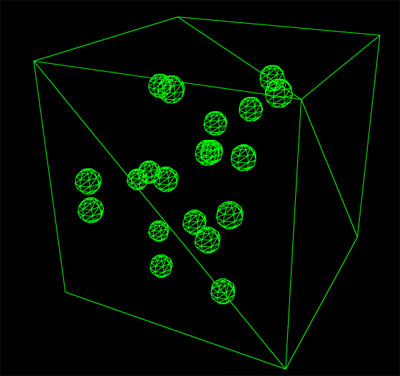
Today I did a quick test to see how easy it is to get PV3D running with WOW (physics engine) and it is amazingly easy! The new Papervision BasicView combined with WOW is so easy to use. The tutorials on the WOW website helped a lot too.


See it in action: http://ansuz.nl/toys/physics3d/main_01.swf

What I built is a cube as world bounds and some spheres who will be dropped in the cube at a random position. Every 10 seconds I reset the spheres so you’ll have something to lookat continuously.
I first build the 3D world and then based on the names of the objects in the 3D world I create the objects for the physics engine. (I want to work this out a little bit further so you can easily convert any 3D world into a fully-animated-physics-enable-3D-world)

There is a link to the source code for this test included at the bottom. Please note that this is very quickly drafted code, not cleaned and/or optimized. Feel free to use it for your own. 🙂

Links:
WOW Engine
PV3D + WOW 1
PV3D + WOW 2
My source code