Useful Firefox add-ons

FireBug
Firebug integrates with Firefox to put a wealth of development tools at your fingertips while you browse. You can edit, debug, and monitor CSS, HTML, and JavaScript live in any web page.

WASP
Provides detailed information about the data being collected trough Query String and Cookies by web analytics solutions (called “tags”, “trackers” or “web bug”), ad networks, behavioral targeting and multivariate testing tools. Covers over 125 tools, including Google Analytics, Omniture SiteCatalyst, Coremetrics, WebTrends and several others.

HTML Validator
Validates HTML documents using the CSE HTML Validator engine for Windows. Requires CSE HTML Validator for Windows.

Screengrab
It will capture what you can see in the window, the entire page, just a selection, a particular frame… basically it saves web pages as images – either to a file, or to the clipboard.

MeasureIt
Draw out a ruler to get the pixel width and height of any elements on a webpage.

Links:

Edits:

  • 17/09/2009: Added MeasureIt.

Fontmanager for Windows

I’ve been on the lookout for a font manager for Windows for a while now and haven’t been able to find anything yet.
I also don’t want to install a billion fonts as this slows your machine down significantly.
A colleague sent me this article on “What slows Windows down?” and it contained the solution to my quest above.

If you need a font for something, you only need to open it in the Windows font browser and it should become available in your application until you close the font browser. Installing and forgetting about fonts is a very easy way to slowly degenerate your boot times.

Now this might not work if you use a lot of fonts all the time, but for me it seems like the perfect solution.

Web Games

Since a colleague and some blog post on Drawlogic have sparked my interest in Unity3D I haven been noticing more and more games that run in or from the browser.

There is Battlefield Heroes that is meant to be released somewhere this year.
Last Friday I discovered Quake Live (I kinda feel ashamed not knowing about that one earlier)
Combine this with Unity3D and you can clearly see a change is going to happen in the world of web (browser) games.

Before there were only Flash games, some of which are excellent! But now you can have a full blown 3D engine running in your browser, how awesome is that!

Howto create a color-scheme for FDT

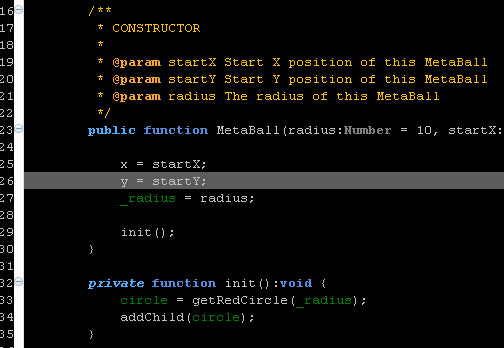
I’ve been wanting to be able to use a different color-scheme (or theme) for FDT for a while. After some investigation I found out how to do this.

FDT dark color scheme

I’ve created the color scheme above and stored in an epf file, you can download it here:
http://ansuz.nl/toys/fdt/eclipse_fdt_dark_01.epf (right click and save as…)

Creating the scheme

  1. Modify your preference for text appearance (see ‘Eclipse + FDT colors‘)
  2. Hit File > Export > General > Preferences and save in a convenient location
  3. Open the saved file in your favourite text editor and remove everything that’s not color related. There are a couple of exceptions to this though, see ‘Eclipse + FDT colors update‘. Others you’ll probably find out in a trial and error proces.
  4. Add ‘file_export_version=3.0’ to the top of your file, so Eclipse knows what version the preferences were exported for. (You can also not delete this line in step 3.) If you omit adding ‘file_export_version=’ the importing of the preferences will fail.
  5. Save the file and you’re done!

Importing a scheme

  1. Hit File > Import > General > Preferences
  2. Click ‘Next’.
  3. Select the scheme to import and click ‘Finish’
  4. All done!

Eclipse + FDT colors update

I figured out what was missing in my previous attempt to store and then load my color preferences. You need to include what version of Eclipse the preferences file is exported for.

file_export_version=3.0

A couple of other things include some boolean settings for not using the system background color and using the ruler (line numbers).

/instance/org.eclipse.ui.editors/AbstractTextEditor.Color.Background.SystemDefault=false
/instance/org.eclipse.ui.editors/AbstractTextEditor.Color.Background=0,0,0

Eclipse + FDT colors

I’m trying to figure out a nice way to apply a color theme to Eclipse. So far no luck, but I have found the places where to edit color settings.

First got to Window > Preferences, then change the color settings in the following locations:

  1. General > Editors > Text Editors
  2. General >Appearance > Color and Fonts
  3. FDT > Editor > Colors
  4. FDT > Editor > Semantic Highlight

Some ideas to explore:
http://drnicwilliams.com/2006/08/08/textmate-theme-for-radrails/ (Modify the *.epf file to include FDT settings? Create a nice color scheme and export settings using File > Export > General > Preferences)
http://www.willianmitsuda.com/eclipse-plugins/eclipse-skins/ (Skin plug-in, see how to get this to work with FDT)

Update: Exported preferences, now trying to figure out how to strip all non color scheme related information.

Update 2: Found a doable way to create a color scheme for FDT, read the howto.