TBC…
Links:
Value Object
Business Object

TBC…
Links:
Value Object
Business Object
This all started out by a back-end colleague mentioning he wanted to try something like this and I was thinking to myself that it shouldn’t be too hard to achieve.
I’m reading out colour values per pixel of an image that I’m externally loading. Based on that info I create a shitload of particles in papervision, the effect is quite cool, but needs to be taken much further from here. Imaging what fun stuff you can do with this!
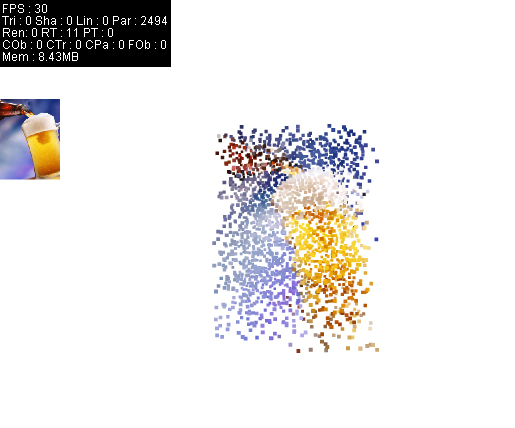
See it in action: http://ansuz.nl/toys/particles_from_image/pv3d/main.swf
To my surprise this is still running at 30 fps with almost 2500 particles in the view, I guess I need to do some more testing to see how many particles we can really push in there.
A next step is going to try this with Flint (particles), because that can easily handle 10-15K particles!
Just a quick note to remember.
Xray seems to be quite interesting to start using, you can use an external swf to debug your applications.
Links:
– OS Flas logging and debugging tools
– Xray project page
– Xray video tutorials
When deserializing data, do it at the very first time you can and continue to use the deserialized data throughout your application. This will save you a lot of aggravation later on.
Take deserializing XML into (Value)Object(s), when you want to change the objects later on, say add, remove, alter properties you can easily do so, it’s quite a bit harder to insert a node or attribute into the (serialized) XML.
Links:
– (De)Serialization
While working on a project of mine this weekend I discovered that there is another difference between pitch, roll, yaw and rotationX, Y, Z in Papervision. Pitch, roll and yaw both ‘rotate’ using the localRotationX, Y, Z, I knew that. What I didn’t know was the following:
When using yaw you are changing the rotationY property between -90 and 90. So when you use yaw and then read out the rotationY values for further calculations, you might be in for a nasty surprise. A way around this is just using rotationY.
Ever got the following error and never found out how to solve it? Here’s the solution.
Error:
Adobe Flash player has stopped a potentially unsafe operation.
The following local application ….
C:\somewhere\file.swf
is try to communicate with…
somedomain.com
To let this app…
Solution:
Create a file with the extension .cfg in the <user>/macromedia/Flash_Player/#Security/FlashPlayerTrust folder (under windows XP this will be: C:\Documents and Settings\_username_\Application Data\Macromedia\Flash Player\#Security\FlashPlayerTrust) and create two lines in it using a regular text editor.
C:\somewhere\
http://somedomain.com
Save the file and rerun your application.
Look so good 😉
When embedding fonts there are a couple of things you need to keep in mind.
Since there is no way to export you library items in another frame than the first in AS3 you need to look for alternatives.
An alternative would be to just accept the increased file size when embedding them in the first frame and showing no information to the user when this is loading. I have noticed though that a simple Latin-1 font adds about 30 kB. One could reason with the widespread availability of broadband this shouldn’t be too bad.
The other option is to embed the font in an external file and decide not to use it for the loader. This keeps your file size down and increases initial loading, that way you can show the user sooner what is happening.
Also keep in mind that when you use a standard embed tag with Flex the embedded font will take up more space than when you use the Flash IDE to embed the fonts. You can avoid this though by specifying in the embed tag which characters you want to embed. A disadvantage of using the embedding with the IDE is that you won’t know for sure if your embedded fonts work until you have uninstalled them from you machine or test on a machine that doesn’t have the font.
Embedding in using the IDE goes as follows:
To embed a font in Flex you use the following code:
Now if you decide to load the font from an external file, you’ll need to register the freshly loaded font with the Flash player.
Some useful links about embedding a subset of a (unicode font):
– Unicode Character Table
– Yahoo on runtime font embedding
That’s about it for embedding fonts.
Update:
If embedded fonts aren’t showing up when compiling with Flex 4, add embedAsCFF=”false” to the embed-tag.
The other day I was trying to animate a mask on a Sprite. It was working only very jerkily or not all. After a lot of trial and error I decided to re-read the docs on masking a Sprite. It turns out you need to add the mask to the the Stage before you can animate it. Quite strange when you are used to just setting the mask in ActionScript 2.
Do not use FocusEvent to dynamically set a selection on a TextField, use MouseEvent instead.
So not:
But: