I was just wondering if mip mapping (pre-calculated texture scaling) does exist for Flash, and since FP9.0r60 it actually does!
Links:
– MipMapping in PV3D
– Adobe on MipMapping

I was just wondering if mip mapping (pre-calculated texture scaling) does exist for Flash, and since FP9.0r60 it actually does!
Links:
– MipMapping in PV3D
– Adobe on MipMapping
I’ve been wanting to be able to use a different color-scheme (or theme) for FDT for a while. After some investigation I found out how to do this.
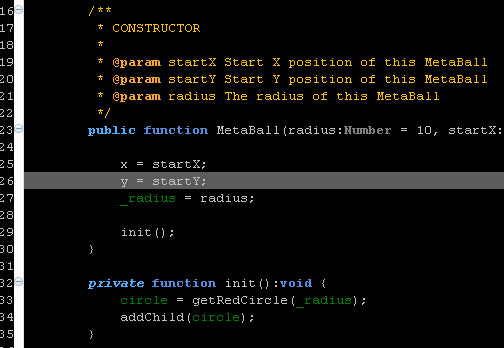
I’ve created the color scheme above and stored in an epf file, you can download it here:
http://ansuz.nl/toys/fdt/eclipse_fdt_dark_01.epf (right click and save as…)
Creating the scheme
Importing a scheme
I figured out what was missing in my previous attempt to store and then load my color preferences. You need to include what version of Eclipse the preferences file is exported for.
file_export_version=3.0
A couple of other things include some boolean settings for not using the system background color and using the ruler (line numbers).
/instance/org.eclipse.ui.editors/AbstractTextEditor.Color.Background.SystemDefault=false
/instance/org.eclipse.ui.editors/AbstractTextEditor.Color.Background=0,0,0
This week I’ve been working on creating a liquid effect in Flash. After a little research and a relapse to my got old 3D days I remembered a principle called ‘Metaballs‘ or ‘Iso surfaces‘. This is a nice way to replecate fluid dynamics in a 2D or 3D environment. So after some web browsing I found a nice implementation in AS3 by Szataniol. The only problem with this implementation was that it lacked alpha, which I needed to be able to apply some filters for a more realistic effect. This was easily solved by adding an extra render pass to calculate the mask. I’ll post the code for that below.
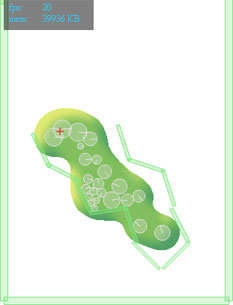
I hooked up the ‘renderer’ from Szataniol to the Box2D physics engine and starting messing around. I ended up making a couple of different versions:
I’ve set up my Main class in such a way that I can easily switch settings to create the different effects by using a different Model class.
[insert class diagram…]
TBC…
I’m trying to figure out a nice way to apply a color theme to Eclipse. So far no luck, but I have found the places where to edit color settings.
First got to Window > Preferences, then change the color settings in the following locations:
Some ideas to explore:
http://drnicwilliams.com/2006/08/08/textmate-theme-for-radrails/ (Modify the *.epf file to include FDT settings? Create a nice color scheme and export settings using File > Export > General > Preferences)
http://www.willianmitsuda.com/eclipse-plugins/eclipse-skins/ (Skin plug-in, see how to get this to work with FDT)
Update: Exported preferences, now trying to figure out how to strip all non color scheme related information.
Update 2: Found a doable way to create a color scheme for FDT, read the howto.
AS3 Flash/Flex 3D Physics Engine JiglibFlash Based on JigLib C++ 3D Physics Engine
Now this is interesting! 😀